Design Principles
Every architectural constraint — the two-phase engine, the AST merging, the POSIX exit codes — exists because a simpler alternative has a concrete, observable failure mode.
This page explains the vocabulary: what each principle is called, exactly what problem it solves, and what goes wrong when you ignore it.
Declarative over Imperative
You describe the environment you want. Protostar figures out how to produce it.
A declarative interface separates what from how. When you write a protostar.toml template or pass --template cli, you are expressing desired state, not issuing a sequence of commands. The engine resolves the execution steps internally.
The contrasting model is imperative scripting: a sequence of shell commands executed top-to-bottom. Imperative scripts are fragile because they bind intent to implementation in a single unbreakable thread. If step 4 of 10 fails, the script has already run steps 1–3 — and you now own the cleanup.
Dry-running only works cleanly on declarative interfaces
Because Protostar operates on declared intent rather than an imperative list of shell calls, --dry-run produces the exact same manifest that a live execution would use — not a best-guess simulation. The plan is real; only the side-effect realization is withheld.
Manifest-First
All intended state changes are collected into a single EnvironmentManifest object before any side effect is permitted to occur.
Protostar's engine operates in two strictly ordered phases:
flowchart TD
    classDef phase fill:#1e293b,stroke:#22d3ee,stroke-width:2px,color:#fff;
    classDef manifest fill:#334155,stroke:#7c4dff,stroke-width:2px,color:#fff;
    classDef action fill:#0f172a,stroke:#38bdf8,stroke-width:1px,color:#e2e8f0;

    A[CLI Input / Flags] --> B["Phase 1 · plan()"]:::phase
    B --> C[EnvironmentManifest]:::manifest
    C -->|Pre-flight Checks Pass| D["Phase 2 · execute()"]:::phase
    C -.->|Dry Run / Inspect| E[--dry-run / --json]:::action
    D --> F[Atomic Disk Mutations]:::action
Phase 1 — plan() is read-only. Every module declares what it needs — files to write, TOML payloads to inject, packages to install, subprocesses to run — into the manifest. Nothing touches disk. Pre-flight checks verify that required system binaries (uv, git, direnv) are present. If any check fails, the process aborts cleanly before the workspace is touched.
Phase 2 — execute(manifest) is the only place side effects are permitted. The SystemExecutor reads the validated manifest and applies mutations in a strict deterministic order.
Why this matters: Most bootstrapping tools execute imperatively — a sequence of operations where each step may depend on the previous one having succeeded. If step 6 fails, steps 1–5 have already mutated your filesystem. Manifest-first guarantees that either the plan is fully valid before you commit, or you get a clean abort. There is no middle state.
The manifest is the source of truth
The --dry-run --json output is a direct serialization of the EnvironmentManifest. What you see is exactly what would be written to disk — not an approximation.
Engine Bulkhead
The core execution engine is completely headless. All terminal interaction lives outside it.
The engine's public surface — Orchestrator.plan() and Orchestrator.execute() — takes and returns pure data objects (InitRequest → EnvironmentManifest → ExecutionResult). It has no knowledge of terminal colors, interactive prompts, spinners, or --json formatting. Those concerns belong entirely to cli.py.
flowchart TD
    classDef cli fill:#0f172a,stroke:#3b82f6,stroke-width:1px,color:#e2e8f0;
    classDef engine fill:#1e293b,stroke:#00e5ff,stroke-width:2px,color:#fff;

    subgraph CLI ["CLI Presentation Layer (cli.py)"]
        direction TB
        TUI["Interactive Wizard"]:::cli
        Spinner["Rich Progress Spinner"]:::cli
        Collision["Collision Prompts"]:::cli
        JSON["--json Envelope Serializer"]:::cli
    end

    subgraph Engine ["Headless Engine (orchestrator.py)"]
        direction TB
        Plan["plan(InitRequest) → Manifest"]:::engine
        Exec["execute(Manifest) → ExecutionResult"]:::engine
    end

    CLI --> Engine
Why this matters: Headless separation is what makes Protostar usable as a library and as a subprocess target for AI agents and CI pipelines. Because the engine accepts InitRequest and returns ExecutionResult without ever touching a terminal, it can be called programmatically, tested in isolation, and driven headlessly without stripping out interactive assumptions. The --json flag doesn't "disable" prompts — there were never any prompts inside the engine to begin with.
Modular & Decoupled
Each supported tool is an independent BootstrapModule subclass. Modules declare their requirements into the manifest and have no knowledge of each other.
When you toggle --no-direnv, the direnv module simply isn't loaded. When you toggle --docker, the Docker module runs its build() method against the manifest and declares a Dockerfile, a .dockerignore update, and a set of ignore patterns. No other module changes. The engine never contains a conditional for Docker.
class DockerModule(BootstrapModule):
    def pre_flight(self, system: System) -> None:
        # Verify docker is accessible if needed
        ...

    def build(self, manifest: EnvironmentManifest) -> None:
        manifest.filesystem.add_file_injection(
            Path("Dockerfile"), self._render_dockerfile()
        )
        manifest.filesystem.add_vcs_ignore("Dockerfile", context=".dockerignore")
# One giant function. Every new tool adds more conditionals.
def scaffold(flags):
    if flags.docker:
        write_dockerfile()
        if flags.ruff and flags.docker:  # combinatorial explosion
            write_ruff_docker_override()
    if flags.direnv:
        write_envrc()
        if flags.direnv and flags.docker:
            write_docker_env_passthrough()
    ...
Why this matters: Decoupling prevents combinatorial explosion. With n tools, a monolithic conditional model can grow to O(2^n) interaction cases. A modular architecture keeps complexity linear — each module is an isolated unit, testable without any other module present. Adding a new tool to Protostar means writing one new class, not auditing every existing flag combination.
Related: tri-state toggling
Because modules are independent, Protostar can offer --<flag> / --no-<flag> overrides for any module without the template author needing to write any conditional logic. See Initialization for the full flag matrix.
Fail Loud, Fail Early
All system dependency checks run during plan() — before execute() is called and before any file is written.
Pre-flight checks are declared by each BootstrapModule via pre_flight(). They run as a batch during the planning phase. If uv is missing from $PATH, Protostar raises MissingDependencyError with the binary name, its purpose, and an installation hint — and the process exits immediately with os.EX_UNAVAILABLE.
No file has been created. No directory has been staged. The workspace is exactly as you left it.
Fail loud
The word "loud" is deliberate. Protostar doesn't swallow errors into a generic "something failed" message. Domain-specific exceptions carry structured context — which binary is missing, what it's used for, and what command will fix it. When things fail unexpectedly (internal bugs), the crash report surfaces your full environment vector and opens a pre-filled GitHub issue automatically.
Non-Destructive AST Merging
Configuration files are parsed into Abstract Syntax Trees and surgically updated. Your existing comments, keys, and formatting are preserved.
When Protostar needs to inject tooling configuration into an existing pyproject.toml, it does not open the file and write a new one. It parses the file via tomlkit into an in-memory AST, merges the incoming payload at the node level, and writes the result back out.
The practical consequence: fields you've customized survive untouched.
[project]
name = "orbital-sim"
version = "0.1.0"  # version pinned manually — do not change

[tool.ruff]
line-length = 100  # non-standard, required for equation alignment
# --- protostar:ruff ---
[tool.ruff.lint]
select = ["E", "F", "I", "UP"]
# --- end:ruff ---
Your comments and custom line-length are untouched. The [tool.ruff.lint] table is injected cleanly.
The same principle applies to .gitignore — Protostar appends deduplicated patterns inside delimited marker blocks rather than replacing the file — and to VS Code settings.json, which is deep-merged at the key level.
Why this matters: Scaffolding tools that write files by template substitution can only safely target new repositories. AST merging allows Protostar to be applied to existing repositories without risk of data loss, making progressive scaffolding and incremental tool adoption practical.
Collision strategies
The merge behavior is tunable. The default is MERGE (preserve your scalars, inject missing nodes). --force-replace switches to OVERWRITE (Protostar's baseline takes precedence on conflicts). See The Environment Manifest for the full behavior matrix.
Actionable Telemetry
When something breaks, Protostar gives you the information you need to fix it — not just that it broke.
Telemetry in Protostar operates at three levels:
1. Subprocess capture. Every shell command Protostar executes (via uv, git, pre-commit, etc.) is run with full stdout / stderr capture. On non-zero exit, the raw streams are surfaced in the terminal panel. You see exactly what uv sync printed when it failed — not a generic "installation failed."
✗  Command failed: uv add numpy scipy

   Diagnostics:
   --- STDERR ---
   error: Package `scipy` requires Python >=3.10
   hint: Your project targets Python 3.9. Update requires-python in pyproject.toml.
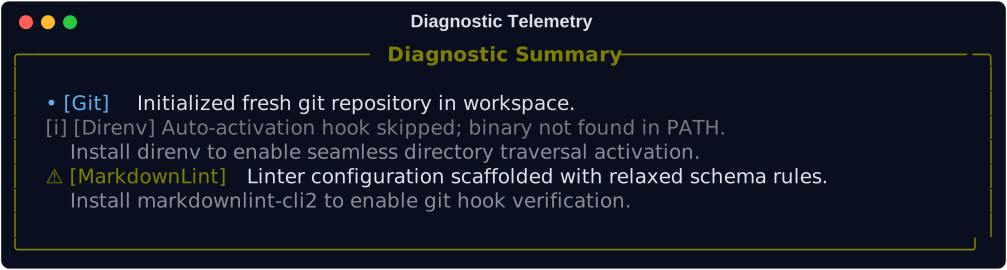
2. Structured diagnostics. Non-fatal events during scaffolding (optional binaries not found, skipped steps) are collected into ExecutionResult.diagnostics and rendered in a summary panel at the end of the run. Nothing is silently dropped.
3. Automated crash reports. When Protostar encounters an unexpected internal exception (a genuine bug, not an operational error), it collects a non-sensitive environment vector — OS, Python version, command invocation, full traceback — and encodes it into a pre-populated GitHub issue URL. You get one link to click. The debugging back-and-forth doesn't happen.
Expected failures vs. unexpected crashes
These are explicitly separated. ProtostarError subclasses (missing dependency, network drop, config parse error) are expected operational failures — clean, formatted, hinted. Unhandled Python exceptions are unexpected crashes — they trigger the crash report URL and exit with os.EX_SOFTWARE. You are never shown a raw Python traceback unless you explicitly ask for it with --verbose.
POSIX Exit Codes
Every failure class maps to a specific, standardized POSIX exit integer — not just 0 (success) or 1 (failure).
POSIX defines a set of exit code semantics beyond the binary success/fail convention. Protostar maps its exception hierarchy directly to them:
| Exit Code | POSIX Name | Exception Class | Trigger Condition |
|---|---|---|---|
0 |
EX_OK |
None | Successful execution |
1 |
Generic Exit | CommandExecutionErrorCommandTimeoutError |
Subprocess failure or command timeout |
64 |
os.EX_USAGE |
InvalidUsageError |
Invalid CLI arguments or command usage syntax |
65 |
os.EX_DATAERR |
TemplateResolutionError |
Template resolution error (corrupted archive, missing variables) |
69 |
os.EX_UNAVAILABLE |
MissingDependencyError |
Missing required system binary (uv, git, etc.) |
70 |
os.EX_SOFTWARE |
(Unhandled exception) | Unhandled internal Python bug (prompts automated bug report) |
74 |
os.EX_IOERR |
FileSystemError |
Local filesystem read/write or permission failure |
75 |
os.EX_TEMPFAIL |
NetworkFetchError |
Transient network failure during remote template download |
77 |
os.EX_NOPERM |
SecurityViolationError |
Security violation (e.g., path traversal Zip Slip) |
78 |
os.EX_CONFIG |
ConfigurationError |
Invalid TOML syntax or conflicting CLI configuration |
130 |
Shell Signal | ExecutionAbortedError |
You aborted interactive wizard prompt (Ctrl+C) |
Why this matters: A script that calls Protostar and checks only if $? -ne 0 can tell that something failed. A script that checks specific exit codes can tell whether the failure was a transient network issue (retry), a missing dependency (prompt user to install), or a configuration error (fail fast and alert). The distinction is the difference between a tool that composes well in automation and one that requires a human in the loop to diagnose failures.
The same structured information is available programmatically via --json, where every error envelope includes the exception class name and a docs_url pointing to the relevant remediation guide.
{
  "api_version": 0,
  "status": "error",
  "error": {
    "type": "MissingDependencyError",
    "message": "Required dependency 'uv' is not installed or not found in $PATH.",
    "hint": "Install uv: curl -LsSf https://astral.sh/uv/install.sh | sh",
    "docs_url": "https://protostar.readthedocs.io/en/stable/usage/troubleshooting/"
  }
}
For CI pipelines and AI agents
Exit codes and --json envelopes are designed to be consumed together. A CI pipeline can check the exit code to gate a build; an AI agent can parse the JSON envelope to understand the failure semantics and decide the next action without human intervention.
Related Pages
- Why Protostar?: How these principles compare against generic templaters like Copier in practice.
- The Environment Manifest: Deep dive into the state object that enforces manifest-first execution.
- The Orchestrator: How the engine bulkhead and two-phase lifecycle are implemented.
- Error Handling Architecture: The full exception hierarchy, POSIX routing table, and crash report pipeline.
- Agent & Machine Interface: Driving Protostar programmatically via
--jsonand--dry-run.