Getting Started
Installation
Protostar is designed to be installed globally as a standalone CLI tool, with native cross-platform support for Linux, macOS, and Windows.
Dependency Isolation (ignore if using brew or uv)
If you install Protostar into an existing Python environment with pip, it will bring in questionary and prompt_toolkit for the interactive TUI wizard. In rare cases, this can conflict with other tools that strictly pin prompt_toolkit versions (e.g., specific IPython or Jupyter stacks). For guaranteed isolation, prefer uv tool or Homebrew.
protostar init is designed to be executed immediately after you mkdir a new project directory. It offers two distinct operational modes: an interactive TUI for discovery, and a headless CLI for speed.
The Interactive Wizard
If you run protostar init without any arguments, it will launch an interactive Terminal User Interface (TUI). This wizard allows you to visually map out your languages, tools, and built-in templates using the spacebar—no CLI flag memorization required.
Headless Scaffolding
For fast, repeatable initialization, you can bypass the TUI entirely and pass your options as CLI flags. Protostar automatically configures common ignore files (.gitignore, .envrc) and adds your preferred IDE settings.
What just happened? In a fraction of a second, Protostar:
- Scaffolded Application & Test Suites: Created a modular package architecture with an executable Typer and Rich CLI application (
src/hyperdrive_cli/cli.py,__init__.py) alongside a unit test suite (tests/test_cli.py). - Resolved Dependencies & Registered Entrypoints: Injected runtime dependencies (
rich,typer), wired the console script entrypoint inpyproject.toml([project.scripts]), and populated development dependency groups. - Configured Static Analysis & Testing ASTs: Generated strictly typed
[tool.mypy]rules, configured[tool.ruff]and[tool.rumdl]linting and formatting opinions, and wired coverage-backed[tool.pytest.ini_options]. - Wired Automation & Pre-Commit Git Hooks: Initialized
.pre-commit-config.yamlwith local toolchain hooks, configured Commitizen conventional commit checks (CHANGELOG.md), and scaffolded task automation injustfile. - Provisioned CI/CD & Documentation: Scaffolded GitHub Actions workflows (
.github/workflows/ci.yml,release.yml,codecov.yml,renovate.json) alongside a ready-to-publish Zensical documentation site (mkdocs.yml,docs/index.md,.readthedocs.yaml). - Applied Universal Workspace Hygiene: Evaluated the virtual environment via
.envrc(direnv), locked dependencies withuv.lock, and safely deduplicated.gitignorewithout overwriting existing entries.
Exploration & Help
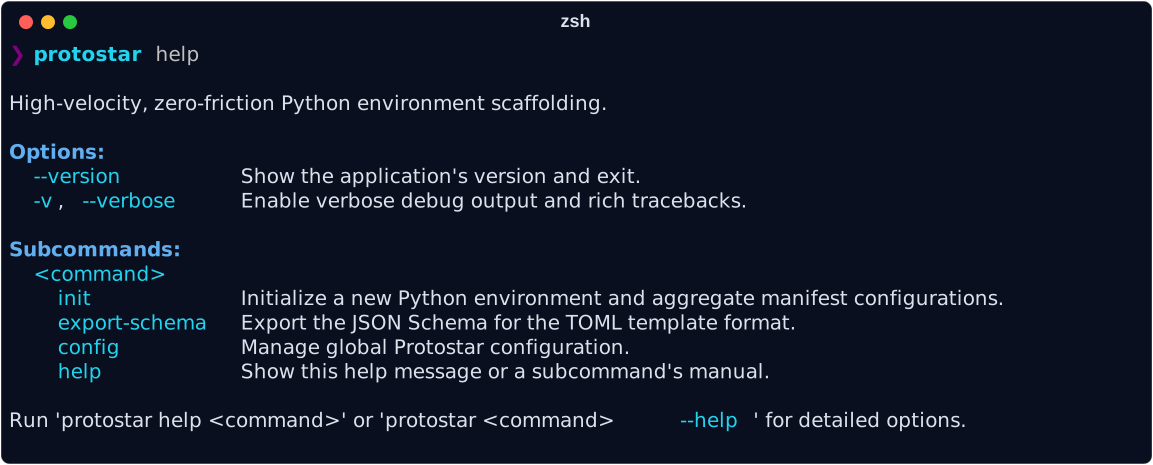
Protostar is self-documenting. You can view the full capabilities matrix and subcommand details directly from your terminal at any time.
Command-Specific Help
You can also get localized help for specific subcommands by running:
Shell Autocomplete & Aliasing
To speed up your workflow, you can enable CLI autocompletion and set up a shorter alias.
1. Enable Autocomplete
Protostar uses argcomplete for dynamic tab-completion. Install the CLI bindings globally matching the toolchain you used to install Protostar:
Path Resolution for uv
If using uv, ensure ~/.local/bin is exported in your system $PATH so your shell can resolve the register-python-argcomplete executable.
2. Set an Alias (Optional)
Because proto is a common namespace, Protostar does not commandeer it by default. If you want the keystroke savings, map it manually in your ~/.zshrc or ~/.bashrc:
Next Steps
Now that your environment is ready, explore the rest of Protostar's features:
- Configuration: Learn how to set up global defaults (like your preferred Python version, dev dependencies, or custom ruff configuration) so you don't have to specify them every time.
- Tooling & Flags Matrix: Explore the full list of supported languages, tools, and built-in templates.
- CLI Reference: Comprehensive reference for all subcommands, global options, and POSIX exit codes.
- Troubleshooting & FAQ: Solutions for missing dependencies, workspace collisions, and IDE schema integration.
- Architecture: Read how the Orchestrator guarantees idempotent disk operations without corrupting your existing files.